


iWindsurf: Weather and Waves
4.892.00 Reviews
App Specs
- Version
- 5.0
- Updated On
- License
- Free
- Downloads
- 10,000+
- Developer
- WeatherFlow
- Categories
- Weather
- Platform
- Android
Screenshots
 Analysis by AppCompare
I judge a wind-and-wave app by whether it helps me make a safer, more sensible plan—not by how many weather numbers it can squeeze onto a screen. iWindsurf: Weather and Waves is aimed squarely at people who want conditions relevant to windsurfing, rather than a broad forecast built mainly around everyday rain and temperature. That focus is useful when I’m choosing a beach or deciding whether a session is worth the drive, though it also means the app is less compelling if I only want a quick answer about whether to carry an umbrella.
Designed around a decision, not just a forecast
WeatherFlow’s app is free to install, with in-app purchases listed from $5.49 to $179.99 per item. It has a 4.8 average from 715 ratings, and 10K+ installs. Those figures suggest an established niche audience, but I would treat them as context rather than proof that its information suits every location or every sailor. The app is for everyone, and version 5.0 requires Android 5.0 or later.
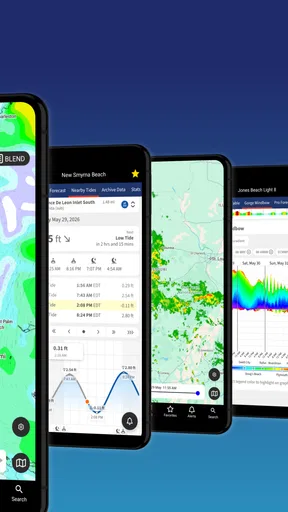
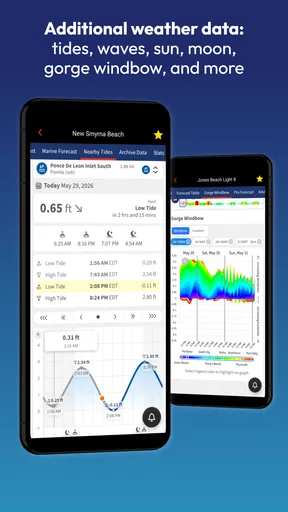
Its strongest reason to exist is the combination of wind conditions with waves and tides. A general weather app can help me understand the day at a glance, but it may not put the water-related details I need at the center of the decision. With a windsurfing-specific tool, I can think about whether the forecast seems appropriate for my ability and plans, then compare that with what I know about the spot. No forecast should replace local judgement: conditions on the water can differ from what a broad regional outlook suggests.
What iWindsurf Brings to the Table
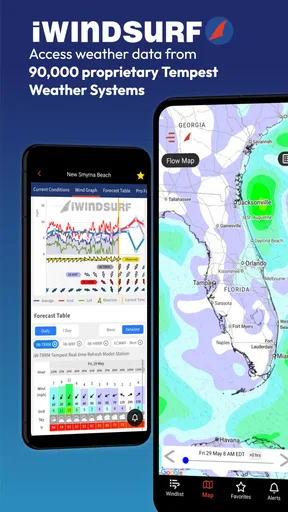
The first thing that caught my eye was how intuitive the app interface is. You don’t have to be a tech wizard to navigate through it. With a few taps, you can access a wealth of information. The iWindsurf app provides real-time weather updates, which is crucial for any windsurfer or beach-goer.
Readability, navigation, and making sense of conditions
For a useful check, I’d focus on the sequence of decisions rather than try to absorb every available reading at once: look at the wind, check its direction, consider the waves and tides, and then decide whether those conditions fit the spot and the people going. This makes a specialized forecast easier to use, especially if I’m checking it in a hurry before leaving home. A number on its own rarely tells the whole story; direction and water conditions can change how appealing the same apparent wind strength feels.
The interface is described as clean and straightforward in the published review, but that does not mean every screen will be equally easy for every person. Weather terminology can be a learning curve for a beginner, and fast scanning matters when I am trying to make a practical decision. I would take time to learn what the displayed readings mean before relying on a quick glance at the beach. If I’m new to windsurfing, I’d also ask an experienced local how they interpret a forecast for that particular launch point.
Detailed Weather Insights
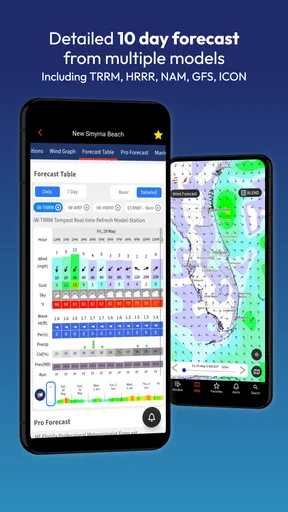
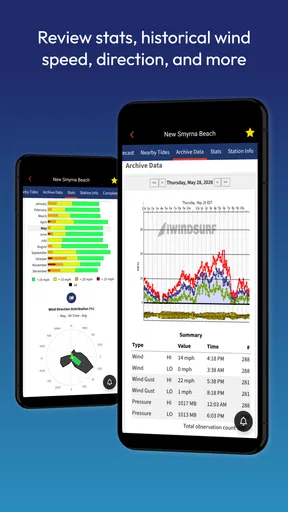
Gone are the days of squinting at the sky, hoping the clouds give you a hint. The app offers comprehensive weather details, including wind speed, direction, and even water temperature. I’ve found this especially useful when planning my outings. The app’s accuracy has saved me countless times from heading out during unsuitable conditions.
Worth Reading Before You Choose

EA SPORTS FC Mobile 26 Is a Bigger Football Game, but It Takes Time

Flipboard Shows What News Apps Must Do Beyond the Feed

Switching to Android Auto Means Rethinking Your Driving Routine

Google Calendar Makes a Crowded Week Easier to Manage

Ludo King Makes the Most of the Minutes Between Plans

Baby Panda World Brings Quick Play to Modern Phones, but Its Game Library Feels Busy
Moreover, the app updates frequently, ensuring that you always have the latest information. There’s nothing worse than getting outdated data when you’re planning to hit the waves. With iWindsurf, that's never a concern.
Using the forecast for a real outing
Imagine I’m weighing up a weekend session: I check conditions at home, compare the wind direction with the beach I usually use, and look at the waves and tides before packing. If the outlook seems borderline, I can check again closer to departure instead of treating an early forecast as a promise. At the beach, I still watch the water and talk to people who know the spot. That workflow uses the app as a planning aid, not as permission to launch regardless of what I see.
A useful habit is to check more than one plausible location when I have a choice of launch sites. A forecast that looks attractive for one beach may not suit another, even if both are nearby. I would also avoid making a long drive based on a single glance: refresh the information before leaving, then make a final decision on arrival. That small pause is especially worthwhile when the conditions are close to my comfort limit.
Motor and sensory considerations
Weather checking is often a short, practical task, so clear navigation and manageable screen-reading demands matter. I’d use the app in a calm setting first, rather than try to learn its layout with wet hands, bright glare, or the pressure of a group waiting to leave. People who find dense weather information tiring may prefer to check only the readings they understand and need, instead of treating every detail as equally important.
For anyone with limited dexterity, the most useful approach is to prepare the plan before arriving at the water: open the relevant forecast, review the conditions, and settle on a backup option while it is still comfortable to use the phone. I would not count on operating a device easily while handling equipment or standing in a windy, wet launch area. Similarly, anyone sensitive to visual clutter or small text should test the actual screens on their own device before depending on them outdoors; a clean overall design does not guarantee that every value will be effortless to read in sunlight.
Community and Social Features
Another cool feature is the community aspect. You can connect with fellow windsurfers, share tips, and even spot reports. It brings a social element to the app that makes it more engaging. I’ve made a few friends through the app, and it’s great to have a network of people who share the same passion.
Also, the app allows you to track your sessions and share them with your community. It's a neat way to keep a record of your progress and get feedback from others.
Where community information helps—and where it doesn’t
Local reports can add useful context to a forecast: someone familiar with a spot may notice a difference between the expected conditions and what is actually happening there. I see that as a reason to compare reports with the forecast, not to substitute one for the other. Reports reflect a particular moment and a particular person’s experience, so I’d check how recent and relevant one is before using it to change my plans.
Session tracking and sharing can also be valuable in a less obvious way. Over time, my own notes and reports can help me remember which conditions I enjoyed, which felt too demanding, and what I would choose next time. That personal reference is more useful than chasing someone else’s idea of a perfect day. I would still keep safety decisions separate from social feedback; enthusiasm from other riders does not tell me whether a session matches my skill or equipment.
Situational access and choosing the right tool
At home or on a reliable connection, I’d use the app to compare conditions and think through the day. At a remote beach, the published review describes offline access and advance downloads as helpful when connectivity is poor. That makes preparation important: check and save what you need before heading somewhere with a weak signal, rather than assume every live detail will be available once you arrive. If the forecast changes or I need information that has not been saved, I would not treat an offline view as current.
Compared with an ordinary weather app, this one makes more sense when wind, waves, tides, and windsurfing reports are central to the decision. The usual general-purpose alternative is often more convenient for a mixed day—checking rain, temperatures, and conditions for several activities—but it may not offer the same sport-specific focus. For a quick family outing or a simple commute forecast, I’d reach for the general app I already use. For choosing whether a windsurfing session is promising, I’d rather start with a tool built around the water.
There is a practical trade-off in the purchase model, too. Downloading the app costs nothing, but some in-app items are paid, and the listed range is broad. I would first work out which information I actually use in my routine before spending anything. A casual beach visitor may get enough from a basic forecast and local observation, while a committed windsurfer who checks conditions often may find it worthwhile to explore what the app offers before deciding whether an optional purchase fits.
Limits, learning curve, and who may want to skip it
The main limitation is also its specialization. If I do not windsurf, or rarely need wave and tide context, much of the app’s purpose may go unused. Beginners may also need time to understand how to turn wind direction, speed, and water conditions into a sensible choice. I would not recommend relying on a single app as a substitute for instruction, local knowledge, suitable equipment, or a conservative decision when conditions feel beyond my ability.
There is also a difference between having information and being able to use it comfortably. A rider who finds small text difficult to scan outdoors, has trouble tapping accurately in harsh conditions, or prefers spoken guidance may want to test the experience before building a routine around it. The simplest workaround is to review the forecast somewhere comfortable, make a clear plan, and avoid trying to navigate through multiple screens at the water’s edge. That reduces friction, though it cannot make a phone easier to handle in every setting.
User Experience and Accessibility
One of the things I appreciate the most is the app’s accessibility. Whether you’re using an Android or iOS device, iWindsurf runs smoothly. The design is clean, with no unnecessary clutter, allowing you to focus solely on the information you need.
The app also offers offline capabilities, which is a blessing when you're at remote beaches with spotty internet connectivity. You can download data in advance and still have access to the essentials.
Remaining barriers and a more inclusive routine
For me, accessibility is partly about whether the app can fit into different routines, not just whether its main screen looks simple. Someone who can comfortably plan at home may find the same task harder in glare, wind, or a crowded launch area. Preparing in advance, keeping the phone protected, and agreeing on a backup plan with a friend can make the information easier to use without depending on last-minute taps.
People with different sensory or motor needs may also approach the same forecast differently. One person may want to review detailed readings; another may find a short checklist and a conversation with a local sailor more usable. I’d treat the app as one way to access conditions, and pair it with whatever helps me make a clear decision. If using the interface itself becomes a distraction near the water, stepping back and choosing a simpler source or asking a trusted person to read the forecast is the better call.
Why You Should Give It a Go
If you're serious about windsurfing or even just a casual enthusiast, this app is definitely worth a download. It provides all the information you need in a user-friendly format. Plus, the added community features make it not just a utility but a hub for windsurfing lovers.
Overall, iWindsurf: Weather and Waves is more than just a weather app. It’s a comprehensive tool that enhances your windsurfing experience. So, next time you’re gearing up for a day on the water, make sure this app is part of your essentials. Trust me, you won’t regret it!
My inclusive verdict
I’d recommend it most to windsurfers who want a focused way to consider wind alongside waves and tides, and who are willing to learn how the readings relate to their regular spots. It can also suit beach-goers who value those details, though it is less useful if their needs stop at a basic local forecast. WeatherFlow has kept the entry point free, and its 4.8 average from 715 ratings gives a prospective user some reassurance that other people value it; neither point removes the need to judge the conditions for yourself.
My practical recommendation is to try it during a low-pressure planning check before making it part of a demanding outing. Explore the forecast and community reports at home, see whether the information is comfortable to read on your device, and prepare for weak connectivity before travelling. If that workflow helps you choose a spot and set realistic expectations, the app has a clear role. If it feels difficult to use or offers more detail than you need, a simpler weather source and advice from people who know the beach may serve you better.
Pros
- Accurate wind forecasts for optimal planning.
- Includes real-time weather station data.
- User-friendly interface with intuitive navigation.
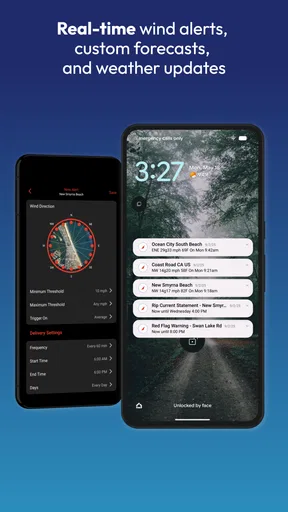
- Customizable alerts for specific weather conditions.
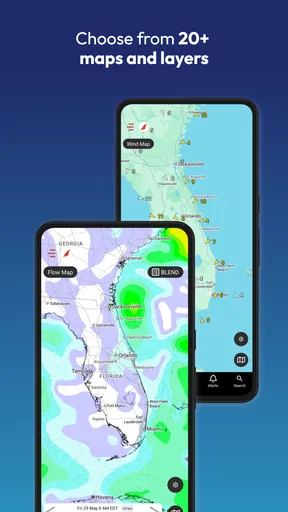
- Comprehensive map views for global locations.
Cons
- Limited offline functionality for remote areas.
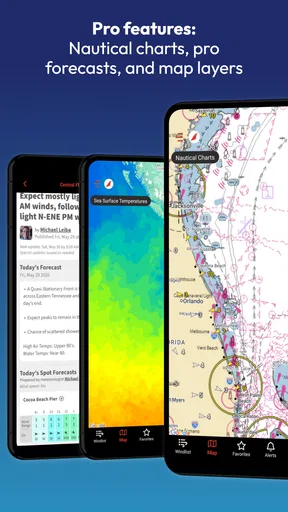
- Some features require a premium subscription.
- Occasional data refresh delays reported.
- Interface can be cluttered with excessive data.
- Battery drain with prolonged use of live updates.
FAQs for iWindsurf: Weather and Waves
What features does iWindsurf: Weather and Waves offer?
iWindsurf provides detailed weather forecasts, real-time wind measurements, and tide information crucial for windsurfing enthusiasts. The app includes interactive maps, alerts for ideal conditions, and community sharing features. It's designed to help users find the best spots and times for windsurfing by providing accurate and up-to-date data.
Is iWindsurf: Weather and Waves suitable for beginners?
Yes, iWindsurf is suitable for both beginners and seasoned windsurfers. The app offers detailed guides and resources that can help newcomers understand weather patterns and windsurfing conditions. Additionally, its user-friendly interface makes it easy for beginners to navigate and find essential information.
Can iWindsurf be used offline?
Some features of iWindsurf require an internet connection, such as real-time weather updates and community interactions. However, users can save certain data for offline use, like previously loaded maps and forecasts, which is useful for areas with limited connectivity. Always check the app settings for offline options.
Does iWindsurf: Weather and Waves offer alerts for changing conditions?
Yes, iWindsurf provides customizable alerts for changing weather and wind conditions. Users can set notifications for specific wind speeds, directions, or weather changes to ensure they are always ready to hit the water at optimal times. This feature is particularly beneficial for planning and safety.
Is there a cost associated with using iWindsurf?
iWindsurf offers a free version with basic features. However, there is a premium subscription available that unlocks additional features such as advanced forecasting tools, ad-free experience, and enhanced map functionalities. Users can choose the plan that best fits their needs depending on their windsurfing frequency and requirements.


